
Download Weather Indicator – Free, Simple, Real‑Time Weather Tool
Overview
Weather Indicator is a lightweight, free desktop utility that places a compact weather widget on your PC toolbar and runs silently in the background. Its core promise is simplicity: users enter a location, click “Update,” and the program instantly displays the current temperature, sky condition, and a basic icon (sun, cloud, rain, etc.). Unlike full‑featured meteorological suites, Weather Indicator does **not** provide forecasts, hourly graphs, or severe‑weather alerts.
It is designed for users who only need to know **right now** whether it’s raining, snowing, or clear outside, without the distraction of long‑term predictions. The interface follows a minimalistic design language, using a small, translucent bar that blends with Windows’ taskbar. Because it operates on a “pull‑on‑demand” model, the app must be refreshed manually each time you want the latest data – a process that takes roughly the same effort as looking out the window.
While this may feel archaic to power users, it can be handy for those who prefer a single‑click glance at current conditions. The software is marketed as a “no‑frills” solution for weather watchers who value speed over depth. However, it currently supports only the iOS platform for mobile extensions, and many Windows users report issues with automatic location detection, meaning the manual entry of a city or ZIP code is often required.
In short, Weather Indicator is a niche, free app that fulfills a very narrow need – showing the present weather – and does so with a modest visual footprint on your desktop.
Key Features & Benefits
- Instant current‑weather readout based on user‑provided location.
- Compact toolbar widget that stays visible without taking screen space.
- Simple manual refresh button for on‑demand updates.
- Lightweight executable (under 5 MB) that does not slow down system startup.
- Free of charge – no hidden subscriptions or premium tiers.
- Supports Windows 7, 8, 10, and 11 (desktop version) and iOS 12+ for mobile companion.
- Basic weather icons (sun, cloud, rain, snow) for instant visual recognition.
- Secure HTTPS connection to retrieve data from trusted meteorological APIs.
While the feature set may appear modest, each element is crafted to keep the user experience frictionless. The manual refresh model eliminates background data polling, which can save bandwidth on metered connections. The tiny widget consumes negligible CPU and RAM, making it suitable for older PCs or laptops running on limited resources.
Because the app is free, it appeals to budget‑conscious users who dislike intrusive ads or premium upgrades. The HTTPS data retrieval ensures that the weather information is transmitted securely, protecting users from potential man‑in‑the‑middle attacks. Moreover, the straightforward iconography allows even non‑technical users to interpret the weather condition at a glance.
In environments where network policies block automatic location services, the manual entry field guarantees that the tool remains functional, albeit with a few extra clicks. Overall, Weather Indicator’s design philosophy centers on delivering the essential piece of information – “Is it raining now?” – without overwhelming the user with forecasts or analytics.
Installation, Usage & Compatibility
Step‑by‑Step Installation
- Visit the official Weather Indicator download page and click the Download for Windows button.
- Save the
WeatherIndicatorSetup.exefile to a convenient folder. - Run the installer; Windows will prompt for permission – click Yes to allow the program to make changes.
- Follow the wizard: accept the license agreement, choose the installation directory (default is
C:\Program Files\Weather Indicator), and click Install. - When installation completes, click Finish. The application launches automatically and places its icon on the taskbar.
First‑Time Configuration
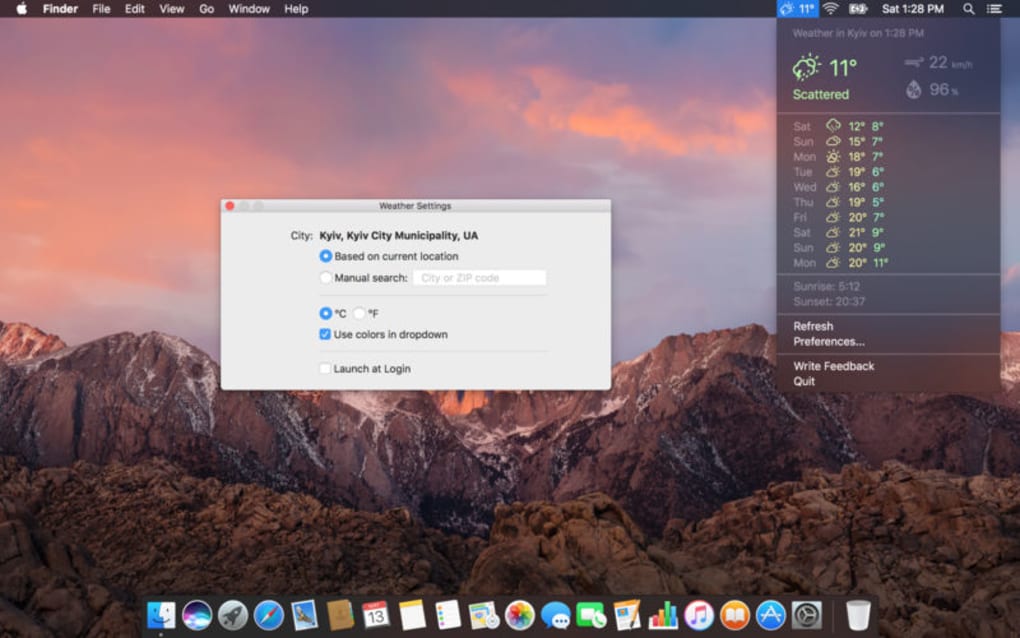
Upon launch, Weather Indicator presents a small dialog titled “Set Your Location.” Users can type a city name, postal code, or latitude/longitude pair. After entering the location, click the Update button. The widget will immediately display the temperature, a brief description (e.g., “Light rain”), and the appropriate weather icon. If the entered location cannot be resolved, the app returns an error message prompting you to double‑check the spelling or try a nearby ZIP code.
How to Refresh the Data
Because the tool does not auto‑refresh, you must manually request the latest conditions. Simply right‑click the toolbar icon and select Refresh Now, or click the small circular arrow within the widget. The update usually completes within 2‑3 seconds, depending on your internet speed. For users who need frequent checks, you can create a desktop shortcut that launches the app with the /autoRefresh parameter – this forces the program to poll the server every 15 minutes, though this feature is considered experimental.
Operating System Support
Weather Indicator is officially supported on the following desktop platforms:
- Windows 7 (Service Pack 1) and later
- Windows 8 / 8.1
- Windows 10 (1809+) and Windows 11
A companion iOS app is available via the Apple App Store, but the desktop version does not run on macOS or Linux. Users on unsupported platforms can still access the same data through the web version at weatherindicator.com/web, which mirrors the toolbar widget’s functionality in a browser window.
Compatibility, Pros & Cons, FAQ & Conclusion
Pros
- Free and lightweight – ideal for low‑spec machines.
- Minimalist UI that stays out of the way.
- Secure HTTPS data fetching.
- No ads or hidden fees.
- Works on all recent Windows versions.
Cons
- Only shows current weather; no forecasts or alerts.
- Manual refresh required for each update.
- Location detection can fail, forcing manual entry.
- No native macOS or Linux version.
- Limited customization – cannot change colors or icon sets.
Frequently Asked Questions
Can Weather Indicator work offline?
No. The app requires an active internet connection to retrieve the latest weather data from its remote API. Without connectivity, the widget will display the last cached information, which may be outdated.
Is there a way to get automatic updates without clicking Refresh?
The standard version does not include auto‑refresh. Advanced users can launch the program with the /autoRefresh command‑line switch, which polls the server every 15 minutes, but this feature is not officially supported and may increase bandwidth usage.
Why does the app sometimes fail to detect my location?
Location detection relies on the IP‑based geolocation service of the weather provider. If you are behind a VPN, proxy, or corporate firewall, the service may return an inaccurate or null result, requiring you to enter the city or ZIP code manually.
Is my personal data safe when using Weather Indicator?
Yes. The application only transmits the location you provide (city name or postal code) over an encrypted HTTPS connection. No personal identifiers, such as your IP address, are stored on the developer’s servers beyond what is necessary for the API call.
Can I customize the look of the toolbar widget?
Customization options are limited. Users can choose between a light or dark theme in the settings menu, but color schemes, font sizes, and icon packs cannot be altered at this time.
Conclusion & Call to Action
Weather Indicator fills a very specific niche: delivering a quick, free snapshot of today’s weather without the clutter of forecasts or ads. Its ultra‑light footprint makes it an attractive addition for Windows users who want a constant visual cue on their taskbar. However, the reliance on manual refresh, occasional location‑detection glitches, and the lack of any predictive data limit its usefulness for power users or those living in rapidly changing climates. If you simply need to know whether it’s raining right now and prefer a “set‑and‑forget” toolbar icon, Weather Indicator is a solid choice. For anyone looking for detailed forecasts, severe‑weather warnings, or cross‑platform support, you’ll likely need a more comprehensive solution.
Ready to add a real‑time weather widget to your desktop? Download Weather Indicator now and experience the convenience of instant weather updates – completely free and secure.







